From Concept to Play Store: The Real Journey of Android App Creation

Featured Posts

Developing an Android app is all about a creative and technical process that combines ideas and solves real-world problems. This journey, which starts from an idea and becomes a published app, is full of learning curves and constant improvement for most developers.
This blog will walk you through the entire Android app development process so you can understand what it really takes to bring your vision to life. Let’s dig into the step-by-step guide.
The Evolving World of Android App Development
Billions of devices in the world are powered by Android, which includes mobiles, smartwatches, TVs, and cars. This wide ecosystem provides developers with so many opportunities to innovate. Android app development is continuously pushing boundaries in 2026, whether it’s a simple tool or a multi-functional AI-driven platform.
Know that it’s the planned process that makes an app successful. This process starts way before a single line of code is written and continues long after your application is launched.
Understanding the Android App Development Process
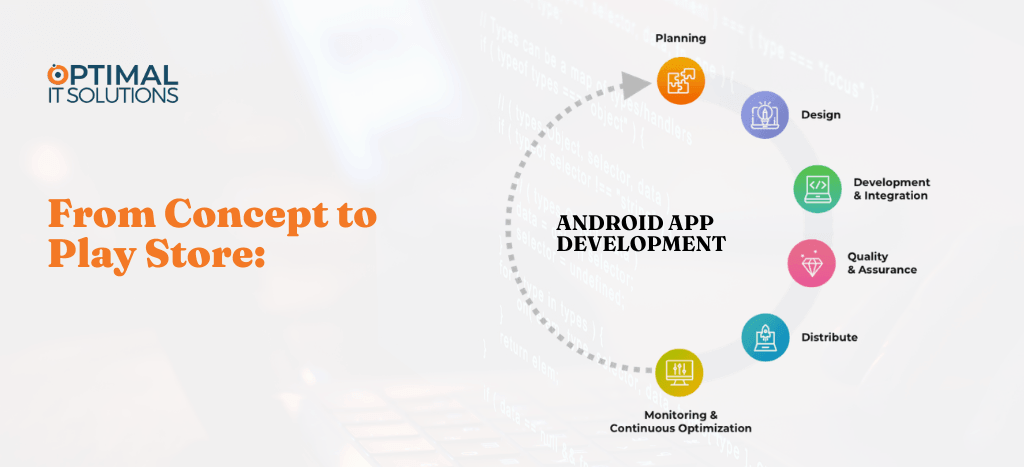
The Android app development process can look different for each team, but certain stages are universal. Each step makes sure that the app is functional and ready for the market.
Let’s go through the main stages of creating an Android app, from the first idea to the final launch.
1. Setting the Foundation
Every app begins with a problem to solve or a need to fill. Teams spend time validating the idea before moving into the development phase. Here are the important questions you need to ask yourself before getting an app developed.
- What problem does the app solve?
- How are others addressing it? What’s missing?
- Who’s likely to download and use your app?
Thorough research ensures that developers build something meaningful and market-ready. Skipping this phase can waste your time and money in the long run. If you plan to hire an app development agency, then make sure you interview them properly.
2. Giving Shape to the Concept
When your idea feels solid, the next step is to turn it into a plan. Here is where product managers and developers define the scope and goals of your Android app project.
- Create a product roadmap and outline what needs to be created.
- Allocate time and milestones for each stage. If you hire an agency, they can give you a proper timeline.
This phase transforms a vague concept into a clear blueprint for the Android app development journey.
3. UI/UX Design
Design plays a major role in user retention. An app might have strong features, but poor design can instantly turn users away.
The UI/UX phase focuses on:
- Creating wireframes and prototypes.
- Choosing color schemes, icons, format, and navigation patterns.
- Testing usability to make sure users can move through your app smoothly.
Designers use tools like Figma or Adobe XD to visualize the interface. The goal is to create an experience that feels natural and consistent with Android design standards.
Red Flags You Should Not Ignore
- Unclear pricing structure.
- No fixed milestones.
- No proper reporting plan.
- Everything shown is from template libraries.
- They cannot describe their decisions.
You want a team that challenges you when needed, not a team that just agrees blindly.
4. App Development
This is the heart of the Android app development process. Developers will translate designs into code and then integrate the features and functionality.
It’s usually divided into two major parts:
- Frontend development: What users see and interact with.
- Backend development: Databases and APIs that make everything work.
Agile methodology is usually used here. It means that development happens in sprints with regular testing and feedback loops. This will make sure that your app stays aligned with your business goals and user needs.
5. Testing and Quality Assurance
Your Android app must pass several layers of testing before it reaches the Play Store. Bugs and performance issues can hurt user trust quickly and ruin months of hard work.
Key testing areas include:
- Verifying that all features on your app work as expected.
- Making sure that the interface is intuitive.
- Checking speed and responsiveness.
- Protecting user data and app integrity.
Testing is ongoing even after the launch because real users interact with apps in ways developers can’t always predict.
Partner with Optimal IT Solutions for High-Performance iOS Apps
Your app deserves more than just code it deserves thoughtful planning, seamless design, and scalable architecture. Let Optimal IT Solutions guide you from concept to launch with a clear roadmap and proven expertise.
6. Deployment
Publishing an Android app to the Play Store involves a few careful steps. Developers will prepare app descriptions, icons, screenshots, and promotional videos that meet Google’s submission guidelines.
Google reviews the app for policy compliance once it’s submitted. If approved, it becomes live, ready for users around the world to download.
Know that the launch day is just the beginning. Developers or an app development agency will monitor reviews, fix bugs, and release updates regularly to keep your users satisfied and engaged.
The Continuous Development Cycle
Post-launch work is often underestimated. Successful developers treat the Play Store release as the start of an ongoing relationship with users.
Here’s what usually follows after deployment:
- Analytics tracking to see how people use the app.
- User feedback analysis to guide feature updates.
- Version updates introduce improvements and keep compatibility with new Android releases.
Maintaining your Android app is a continuous effort that involves adapting and evolving with user expectations.
Challenges in Android App Development
Even experienced developers face hurdles. Some common challenges include:
- Device fragmentation: Android runs on thousands of devices with different screen sizes and OS versions.
- Security concerns: Protecting user data requires ongoing care.
- Performance optimization: Guaranteeing smooth performance on all hardware levels.
- Competition: The Play Store is saturated, so standing out requires innovation and quality.
Overcoming these challenges takes skill and patience, but that is exactly what separates a good app from a great one.
Best Practices for Building a Successful Android App
Professionals often follow a few best practices to make the most of the Android app development process:
- Keep the design simple, as your users should know what to do without instructions.
- Focus on speed because even minor delays can hurt retention.
- Prioritize security and data privacy as they are essential for user trust.
- Integrating feedback loops early will let testers and users guide improvements.
- Use a modular architecture that’s easier to maintain and update later.
Following these principles will create a stronger app that will perform well and adapt easily to new technologies.
Future of Android App Development
The future of Android app development looks promising with technologies like AI, AR, and 5G. Developers are moving toward smarter, more personalized experiences, like the apps that can predict needs, automate tasks, and connect on multiple devices flawlessly.
Arising trends include:
- AI-driven personalization for recommendations and voice interactions.
- AR features for immersive shopping and gaming experiences.
- Wearable integration for health, productivity, and smart lifestyle apps.
These innovations will continue shaping how people interact with technology, which makes Android apps even more central to daily life.
How Optimal IT Solutions Approaches Android App Development for Long-Term Success
At Optimal IT Solutions, Android app development begins with strategy, not just coding. The team focuses on understanding business goals, user expectations, and market demand before moving into design and development. By combining modern technologies, scalable architecture, and performance-driven design, every Android app is built to perform reliably across multiple devices and Android versions.
This structured approach ensures that businesses launch applications that are not only functional but also scalable, secure, and ready for long-term growth in the competitive Android ecosystem.
Conclusion
The journey from concept to the Play Store is a bit overwhelming, but it’s rewarding. The Android app development process is all about problem-solving and continuous improvement with creativity to attract users.
As Android’s ecosystem grows, so does the innovation potential. Every Android app that makes it to the Play Store represents not just lines of code, but the story of an idea brought to life.
FAQ's
The time required to develop an Android app depends on the complexity of the project. A simple app may take 2–3 months, while a feature-rich or enterprise-level application can take 6 months or more. Proper planning, design, development, and testing all contribute to the overall timeline.
The most commonly used programming languages for Android app development are Kotlin and Java. Kotlin is now the preferred language recommended by Google because it offers better performance, improved safety features, and faster development.
Android app development costs vary depending on the app’s features, complexity, design requirements, and development team. A basic app can cost a few thousand dollars, while advanced applications with integrations, AI features, or complex functionality may require a larger investment.
The first step is idea validation and market research. Businesses need to clearly define the problem the app will solve, identify the target audience, and analyze competitors before starting the development process.
Testing ensures that the app functions properly across different Android devices and operating systems. It helps identify bugs, improve performance, and provide a smooth user experience before publishing the app on the Google Play Store.
After launch, developers continue monitoring performance, fixing bugs, and releasing updates. Regular updates help improve features, maintain compatibility with new Android versions, and enhance user experience.
Let's Connect With Our Experts
Get valuable consultation form our professionals to discuss your projects. We are here to help you with all of your queries.
Revolutionize Your Business
Collaborate with us and become a trendsetter through our innovative approach.