Custom Web Development Services | The Complete Guide for US Businesses

Featured Posts
Key Takeaways
- Custom web development services build a website or application around your specific business processes, rather than forcing your business to adapt to a pre-built template.
- Businesses typically move from templates to custom builds once they hit limitations around performance, integrations, scalability, or brand differentiation.
- A structured custom website design and development process discovery, design, development, QA, launch, and support reduces cost overruns and missed deadlines.
- Enterprise web development introduces additional requirements: legacy system integration, compliance, multi-team workflows, and high-availability infrastructure.
- Security, accessibility (WCAG), Core Web Vitals, and technical SEO should be built in from day one, not bolted on after launch.
- Costs vary widely based on scope a marketing site and a multi-module web application are not priced the same way, and vendors who quote a flat number without discovery should raise questions.
- AI-ready websites those with clean structured data, clear content hierarchy, and fast-loading pages are increasingly important as search shifts toward AI Overviews and answer engines.
- Choosing the right web development company USA-based or otherwise comes down to process transparency, relevant portfolio work, and how they handle post-launch support.
💡 Overview: Custom web development services cover the design, engineering, and integration work needed to build a website or application that’s built specifically around a business’s workflows, brand, and technical requirements rather than a pre-built theme or page builder.This guide is published by Optimal IT Solutions, a US-based custom web development team, and is built as a pillar resource: it’s meant to be the single, comprehensive reference for how custom development works, when it’s the right choice, what it costs, and how to evaluate a partner with linked deep-dive articles branching off from the sections below as your business needs more detail on a specific area (enterprise development, ecommerce builds, API integration, and so on).
Most business owners don’t wake up wanting a “custom” website. They wake up frustrated that their current site can’t do something it can’t talk to their inventory system, it breaks on mobile, or it simply looks like every other business in their industry.
That frustration is usually the real starting point for custom web development services. A template got you started. Now it’s holding you back.
This guide walks through what custom web development actually involves, when it makes sense (and when it doesn’t), what the process looks like from first call to launch, and how to evaluate a web development company USA businesses can actually trust with a real budget. We’ll cover enterprise web development needs separately from small business needs, because they are genuinely different problems.
By the end, you’ll have a clear framework for deciding whether custom development is the right move, what it should cost, and what to look for before signing a contract. This guide draws on the day-to-day project experience of the Optimal IT Solutions team, who build custom websites and applications for US businesses across these exact scenarios.
What Custom Web Development Services Actually Are
Custom web development services refer to building a website, web application, or digital platform from the ground up or substantially modifying an existing framework to match a specific business’s workflows, brand, and technical requirements, rather than using an off-the-shelf theme or drag-and-drop builder.
This is different from website design in the general sense. Design covers how something looks. Development covers how it works the code, the databases, the integrations, the logic that runs behind the interface.
In practice, “custom” can mean:
- A fully hand-coded site built on a framework like Laravel, Django, or Node.js
- A headless CMS setup with a custom front end
- A heavily modified WordPress or Shopify build with custom plugins and themes
- A proprietary web application built for internal or customer-facing use
None of these are inherently “better” than a template. The right choice depends on what the business actually needs the site to do.
Why Businesses Choose Custom Solutions Over Templates
A template platform is built to serve thousands of unrelated businesses with one codebase which means every business using it inherits the same ceiling, whether or not they’ve hit it yet.
Businesses typically hit that ceiling in one of these situations:
- Performance ceiling: The site slows down as content, products, or traffic grow, and no amount of plugin tweaking fixes it.
- Integration limits: The business needs the website to talk to a CRM, ERP, or inventory system, and the template platform doesn’t support it cleanly.
- Brand differentiation: In a crowded market, looking identical to five competitors using the same theme becomes a liability.
- Workflow complexity: Booking systems, quoting tools, client portals, or multi-step applications don’t fit into standard page-builder logic.
- Compliance requirements: Industries like healthcare, finance, and legal often need custom-built security and data-handling logic that generic platforms can’t guarantee.
💡 KEY INSIGHT: The decision to go custom is rarely about wanting something custom for its own sake it’s almost always triggered by a specific operational pain point (a broken integration, a performance wall, a security gap). If you can’t name that specific trigger, it’s worth pressure-testing whether custom development is actually the right next step yet.
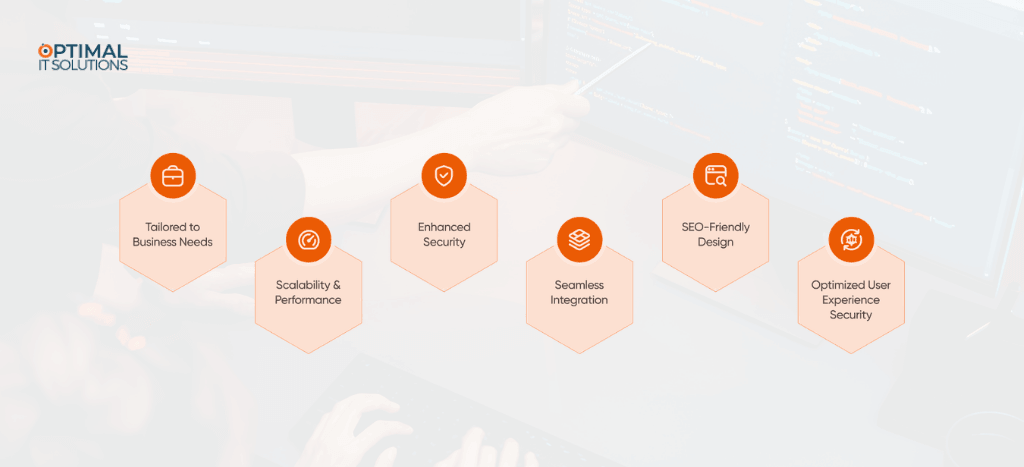
Benefits of Custom Website Development
Benefit | What It Means in Practice |
Full ownership of code | No platform lock-in; you control hosting, updates, and licensing |
Tailored functionality | Features built around your actual workflow, not a generic use case |
Better long-term performance | Only the code you need loads no bloated plugin stacks |
Stronger security posture | No shared vulnerabilities from mass-market plugins or themes |
Scalability | Architecture can be designed to handle growth from day one |
Unique brand experience | No visual or structural constraints from a theme marketplace |
Deeper integrations | Direct API-level connections to internal systems |
💡 COMMON MISTAKE: Business owners sometimes assume “custom” automatically means “better SEO” or “automatically faster.” Neither is true unless performance and SEO are explicitly built into the development plan from the start.
AI-Powered Search Is Changing Everything
Google’s AI Overviews now appear at the top of many search results, providing direct answers before users even click a link. This means businesses need to optimize not just for rankings, but for being cited by AI systems. The same applies to ChatGPT, Perplexity, and other AI search tools that millions of Americans use daily to find products, services, and information.
💡 PRO TIP : Ask a prospective vendor to walk you through one past project where custom development directly solved a measurable business problem a checkout abandonment issue, a reporting bottleneck, a load-time complaint. Vague answers about “better performance” without a specific before-and-after story are a sign the vendor is speaking in generalities rather than experience.
The Custom Website Design and Development Process
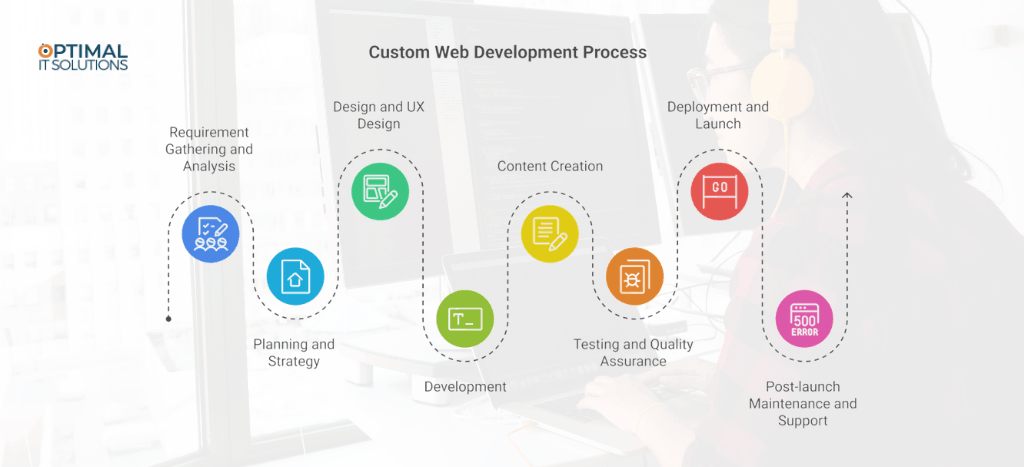
A reliable custom website design and development process generally follows six phases. Skipping any of these is where most project failures start.
1. Discovery and Requirements Gathering
The development team maps your business goals, technical requirements, existing systems, and target users. This phase should produce a written scope document not a verbal agreement.
2. Information Architecture and UX Planning
Before any visual design happens, the site’s structure is mapped: page hierarchy, user flows, and content organization. This is also where technical SEO architecture decisions get made.
3. UI Design
Wireframes evolve into high-fidelity designs reflecting brand identity, accessibility standards, and mobile-first layouts.
4. Development
Front-end and back-end development happen here, including database architecture, API integrations, and CMS setup if applicable.
5. Quality Assurance and Testing
Cross-browser testing, mobile responsiveness checks, load testing, security scanning, and accessibility audits (WCAG compliance) happen before launch not after.
6. Launch and Post-Launch Support
Deployment, DNS/hosting configuration, monitoring setup, and an agreed support window for bug fixes.
💡 BEST PRACTICE: Ask any vendor to show you exactly where in this process you’ll review and approve work. Projects that go dark for six weeks between “design approved” and “here’s your site” are a red flag.
Ready to Build a Website That Actually Works for Your Business?
Templates can only take your business so far. If integrations, performance, or growth are holding your current site back, Optimal IT Solutions can help you map out what a custom build should actually look like and what it should cost.
The Custom Website Design and Development Process
SEO is the process of optimizing your website and online content so that it ranks higher in search engine results particularly Google for the keywords and questions your target customers are searching.
SEO is the foundation of long term digital growth. Unlike paid ads, the traffic generated by SEO doesn’t stop when your budget runs out. A well optimized page can rank and drive leads for months or years.
Modern SEO in 2026 goes well beyond stuffing keywords into web pages. It encompasses:
- Technical SEO: site speed, Core Web Vitals, mobile optimization, structured data, and crawlability
- On-Page SEO: content quality, keyword intent alignment, meta tags, headings, and internal linking
- Off-Page SEO: building authoritative backlinks from reputable sites
- Entity-Based SEO: establishing your brand as a recognized entity in your niche
- AI & GEO Optimization: structuring content to be cited by AI-powered search tools
- Local SEO: optimizing for ‘near me’ and location-specific searches
A reliable custom website design and development process generally follows six phases. Skipping any of these is where most project failures start.
💡 PRO TIP: Request a staging link early in development, not just at the end. Reviewing a working build in stages rather than only a finished product catches misunderstandings about functionality while they’re still cheap to fix.
1. Discovery and Requirements Gathering
The development team maps your business goals, technical requirements, existing systems, and target users. This phase should produce a written scope document not a verbal agreement.
2. Information Architecture and UX Planning
Before any visual design happens, the site’s structure is mapped: page hierarchy, user flows, and content organization. This is also where technical SEO architecture decisions get made.
3. UI Design
Wireframes evolve into high-fidelity designs reflecting brand identity, accessibility standards, and mobile-first layouts.
4. Development
Front-end and back-end development happen here, including database architecture, API integrations, and CMS setup if applicable.
5. Quality Assurance and Testing
Cross-browser testing, mobile responsiveness checks, load testing, security scanning, and accessibility audits (WCAG compliance) happen before launch not after.
6. Launch and Post-Launch Support
Deployment, DNS/hosting configuration, monitoring setup, and an agreed support window for bug fixes.
KEY INSIGHT: Most project delays don’t come from writing code slowly. They come from unclear approval checkpoints, where nobody was sure who needed to sign off on what before the next phase could start. A clear approval structure at each phase prevents more delays than any amount of extra developer hours.
Types of Custom Web Development Services
Enterprise Web Development
Enterprise web development involves larger-scale considerations: multiple stakeholder teams, legacy system integration, high-availability infrastructure, and often, regulatory compliance (HIPAA, SOC 2, PCI-DSS, depending on industry). Timelines are longer, and change management processes matter as much as the code itself.
Custom CMS Solutions
Rather than forcing content editors into a rigid page builder, a custom CMS setup (often headless, using tools like Sanity, Contentful, or a custom Django/Node backend) gives marketing teams flexible content control without touching code.
Ecommerce Development
Custom ecommerce builds go beyond product pages they involve inventory sync, custom checkout logic, subscription models, multi-currency support, and integration with fulfillment systems.
Web Application Development
This covers customer portals, internal dashboards, SaaS products, and booking or scheduling systems essentially, any site where users log in and interact with dynamic data rather than just reading content.
API Integrations
Custom development often centers on connecting a website to third-party services: payment processors, shipping calculators, marketing automation tools, or internal APIs.
CRM Integrations
Syncing web forms, customer data, and behavioral tracking directly into platforms like Salesforce or HubSpot, so sales and marketing teams work from a single source of truth.
ERP Integrations
For businesses with inventory, manufacturing, or complex order management, connecting the website directly to an ERP system (like NetSuite or SAP) eliminates manual data entry and reduces errors.
💡 Expert Insight: ERP and CRM integrations are almost always the most underestimated part of a project timeline. The web development itself is usually predictable; the surprises come from undocumented quirks in the third-party system’s API, rate limits, or data formatting rules. Build extra review time into any project involving a legacy ERP system specifically.
More Traffic. More Leads. More Revenue. Let's Make It Happen.
One free strategy call could change the trajectory of your business. No pressure, no fluff just a clear plan to grow.
Custom Development Types at a Glance
Type | Best For | Typical Complexity |
Enterprise Web Development | Large organizations, multi-team workflows | High |
Custom CMS Solutions | Marketing teams needing flexible content control | Medium |
Ecommerce Development | Online retailers, subscription businesses | Medium–High |
Web Application Development | Customer portals, booking systems, SaaS products | High |
API Integrations | Connecting to payment, shipping, or automation tools | Low–Medium |
CRM Integrations | Sales and marketing teams needing unified data | Medium |
ERP Integrations | Inventory, manufacturing, complex order management | High |
Performance, Security, and Scalability
Performance Optimization
A custom-built site should be faster than a template by default but only if performance is treated as a requirement, not an afterthought. This includes image optimization, code splitting, caching strategy, and CDN configuration.
Security Best Practices
- Enforce HTTPS everywhere, including internal API calls
- Sanitize and validate all user input server-side
- Keep dependencies patched and monitored for known vulnerabilities
- Use role-based access control for any admin or CMS area
- Run regular penetration testing for high-risk applications (ecommerce, finance, healthcare)
Scalability
Scalability isn’t only about traffic spikes. It also means the codebase can accommodate new features without a full rebuild. Modular architecture and clean documentation matter as much as server infrastructure here.
💡 PRO TIP: Ask your development partner what “scalable” specifically means for your project traffic scalability, feature scalability, and team scalability (multiple developers working on the codebase later) are three different engineering concerns, and a vendor should be able to speak to all three, not just server capacity.
Mobile Responsiveness and Accessibility (WCAG)
Mobile-first design is no longer optional most US traffic across industries is mobile-majority. A custom build should be designed for small screens first, then scaled up, not the reverse.
Accessibility, guided by WCAG 2.2 standards, means:
- Sufficient color contrast for readability
- Keyboard navigability for all interactive elements
- Alt text for meaningful images
- Proper heading structure for screen readers
- Form labels and error messages that assistive technology can interpret
SEO Considerations During Development
Technical SEO decisions made during development are harder and more expensive to fix after launch.
Core Web Vitals
Largest Contentful Paint, Interaction to Next Paint, and Cumulative Layout Shift directly affect both user experience and search rankings. These should be tested throughout development, not just at the end.
Technical SEO
- Clean, descriptive URL structures
- Proper canonical tags
- XML sitemap generation
- Structured internal linking
Site Architecture
A logical, shallow site structure (important pages reachable within 2–3 clicks from the homepage) helps both users and search engines understand priority content.
Schema Markup
Structured data (Organization, Product, FAQ, Article schema, etc.) helps search engines and increasingly, AI answer engines understand and accurately represent your content.
💡 KEY INSIGHT: AI answer engines tend to favor content that states a direct answer in the first sentence or two of a section, followed by supporting detail the inverted-pyramid style used in journalism. Sites structured as long, unbroken narrative paragraphs are harder for these systems to extract and cite accurately, regardless of how good the underlying information is.
Building AI-Ready Websites
As search behavior shifts toward AI Overviews, ChatGPT, , Perplexity, and similar tools, websites need to be structured for machine readability as much as human readability.
What makes a site AI-ready:
- Clear, well-organized headings that directly answer likely questions
- Structured data (schema markup) that makes content machine-parseable
- Fast load times, since many AI crawlers deprioritize slow sites
- Concise, factual content blocks that can be cited or summarized accurately
- Clean HTML without excessive JavaScript-rendered content that crawlers can’t easily read
This is a genuinely new consideration in web development a site can rank well in traditional search and still be poorly optimized for how AI systems extract and cite information.
Choosing a Web Development Company USA Businesses Can Trust
Custom Development vs. Platform-Based Development
Factor | Custom Development | Platform-Based (e.g., Shopify, Wix, Webflow) |
Upfront cost | Higher | Lower |
Flexibility | Very high | Limited by platform |
Ongoing fees | Hosting/maintenance only | Platform subscription + apps |
Speed to launch | Longer | Faster |
Best for | Complex workflows, integrations, unique brand needs | Standard ecommerce, simple marketing sites |
Scalability ceiling | High, if architected well | Bound by platform limits |
Cost Factors in Custom Web Development
Costs vary significantly based on scope, and any vendor quoting a fixed number without a discovery conversation should be questioned. Rough factors that affect cost:
- Number of unique page templates and custom components
- Complexity and number of third-party integrations
- Whether a custom CMS or admin panel is required
- Ecommerce functionality and payment processing complexity
- Compliance requirements (healthcare, finance, legal)
- Ongoing maintenance and support scope
A basic custom marketing site sits at a different price point than a multi-module web application with user accounts, payment processing, and CRM integration. Treat any published “starting at” price as a rough anchor, not a quote.
Your Website Should Work As Hard As You Do
If your current website is holding your business back, reach out to Optimal IT Solutions to talk through your goals before committing to a full rebuild, it’s worth mapping out exactly what “custom” should mean for your specific budget and timeline.
General Industry Price Bands
These are broad, US-market order-of-magnitude ranges commonly seen across the industry not a quote, and actual pricing depends entirely on your specific scope:
Project Type | Rough Industry Range |
Custom marketing website (basic) | Low five figures |
Custom marketing website (advanced, custom CMS) | Mid five figures |
Custom ecommerce platform | Mid-to-high five figures, into six figures for complex catalogs |
Web application (portals, booking, SaaS) | High five figures to low six figures |
Enterprise platform with integrations | Six figures and up |
💡 KEY INSIGHT: These ranges move based on integration count, compliance requirements, and content volume far more than on visual design complexity. Two sites that look similarly “simple” can have very different price tags if one requires ERP integration and the other doesn’t.
Timeline Expectations
Project Type | Typical Timeline |
Custom marketing website (10–15 pages) | 6–10 weeks |
Custom ecommerce site | 10–16 weeks |
Web application (customer portal, booking system) | 12–20 weeks |
Enterprise platform with integrations | 20+ weeks |
Measuring Success After Launch
Launch isn’t the finish line it’s the point where you start measuring whether the investment is paying off. A few core metrics matter across nearly every custom project:
- Core Web Vitals scores (LCP, INP, CLS) tracked via Google Search Console or PageSpeed Insights, not a one-time test
- Uptime and error rates monitored through server or application logs, especially for web applications with logins
- Conversion or task-completion rate form submissions, checkout completions, or whatever action the site exists to drive
- Organic search visibility rankings and impressions for target keywords, tracked over months, not days
- Page load consistency performance under real traffic conditions, not just a single lab test
Mistakes Businesses Should Avoid
- Skipping the requirements-gathering phase to save time: This almost always costs more time later through scope confusion.
- Choosing a vendor solely on price: The cheapest quote often reflects the fewest hours allocated to QA and planning.
- Not budgeting for post-launch support: Websites need maintenance; treating launch as the finish line leads to security and performance decay.
- Ignoring content readiness: Development can’t finish on time if final copy and images aren’t ready when needed.
- Underestimating integration complexity: Third-party APIs don’t always behave as documented build in buffer time.
Future Trends in Custom Web Development
💡 PRO TIP: Ask your development partner what “scalable” specifically means for your project traffic scalability, feature scalability, and team scalability (multiple developers working on the codebase later) are three different engineering concerns, and a vendor should be able to speak to all three, not just server capacity.
- AI-assisted personalization dynamic content and layouts based on user behavior, built directly into the application logic
- Answer engine optimization becoming a standard part of technical SEO planning, not an afterthought
- Composable architecture combining best-in-class tools (headless CMS, separate commerce engine, custom front end) rather than monolithic platforms
- Increased accessibility regulation scrutiny, particularly for businesses serving government or healthcare sectors
- Edge computing and CDN-level logic reducing latency for global user bases
Glossary of Key Terms
API (Application Programming Interface): A defined way for two software systems to exchange data used to connect a website to payment processors, CRMs, ERPs, and other tools.
Core Web Vitals: A set of Google metrics (LCP, INP, CLS) measuring loading speed, interactivity, and visual stability of a webpage.
CRM (Customer Relationship Management): Software (like Salesforce or HubSpot) used to manage customer data and sales relationships.
ERP (Enterprise Resource Planning): Software (like NetSuite or SAP) used to manage core business processes such as inventory, manufacturing, and finance.
Headless CMS: A content management system that separates content storage from the front-end display, giving developers flexibility in how content is presented.
Schema Markup: Structured data code added to a webpage that helps search engines and AI systems understand and accurately represent its content.
WCAG (Web Content Accessibility Guidelines): The international standard for making websites accessible to people with disabilities.
Web Application: A dynamic, interactive website where users typically log in and interact with data as opposed to a static, read-only site.
Stop Adapting Your Business to Fit Your Website
If you’re patching around limitations instead of solving them, it might be time for a different approach. Optimal IT Solutions designs and builds custom websites built around your workflows, your integrations, and your growth plans,
Conclusion
Custom web development isn’t the right answer for every business, but for companies that have outgrown what templates and page builders can offer, it solves real, specific problems performance ceilings, integration gaps, and brand differentiation, among others.
The businesses that get the best results treat it as a structured process: clear discovery, defined scope, built-in security and accessibility, and a realistic maintenance plan after launch not just a one-time build. That’s the approach the Optimal IT Solutions team follows on every custom project, regardless of size.
FAQ's
Web design focuses on the visual layout, user experience, and branding of a site. Web development focuses on the technical build the code, databases, and functionality that make the design work. Most custom projects require both working together closely.
Cost depends heavily on scope a marketing site, ecommerce store, and custom web application are priced very differently. Discovery-based quotes, rather than flat “package” pricing, typically reflect a more accurate estimate.
It depends on the business’s actual needs. If a well-configured template or platform meets your functionality and branding goals, custom development may be unnecessary. It’s worth it when workflow complexity or integration needs exceed what templates can handle.
Timelines typically range from 6 weeks for a straightforward marketing site to 20+ weeks for enterprise platforms with multiple integrations, though scope changes commonly affect these estimates.
A traditional CMS (like standard WordPress) manages content and presentation together. A headless CMS separates content management from the front-end display, giving developers more flexibility in how and where content is presented.
Optimal IT Solutions works across marketing websites, ecommerce platforms, and more complex web applications, tailoring the approach to each business’s specific workflow, integration, and growth needs.
A well-run project includes a change request process, where scope adjustments are documented, estimated, and approved before development continues protecting both budget and timeline.
This should be clearly defined in your contract before work begins. Reputable vendors typically transfer full code ownership upon final payment.
In most cases, yes, through API integrations though the complexity depends on the specific tool’s API capabilities and documentation.
It can be, if it involves custom theme and plugin development rather than pre-built themes. A stock WordPress theme with minor edits is not typically considered custom development.
Let's Connect With Our Experts
Get valuable consultation form our professionals to discuss your projects. We are here to help you with all of your queries.
Revolutionize Your Business
Collaborate with us and become a trendsetter through our innovative approach.